I Built My Own GitHub Home Page with Fable 5.1 — Because the Default Feed Is Low-Information
GitHub’s home page shows fewer than ten updates at a time. To see more, I have to keep scrolling like Twitter, yet I still cannot tell what my friends or the developers I care about have been working on lately.
Today I wrote my-github-home-page
Today I used Fable 5.1 to build my-github-home-page. It groups recent activity by the people I follow, so I can see at a glance who is working on which repository and whether they pushed, opened a PR, reviewed code, or shipped a release.
GitHub: https://github.com/adlternative/my-github-home-page
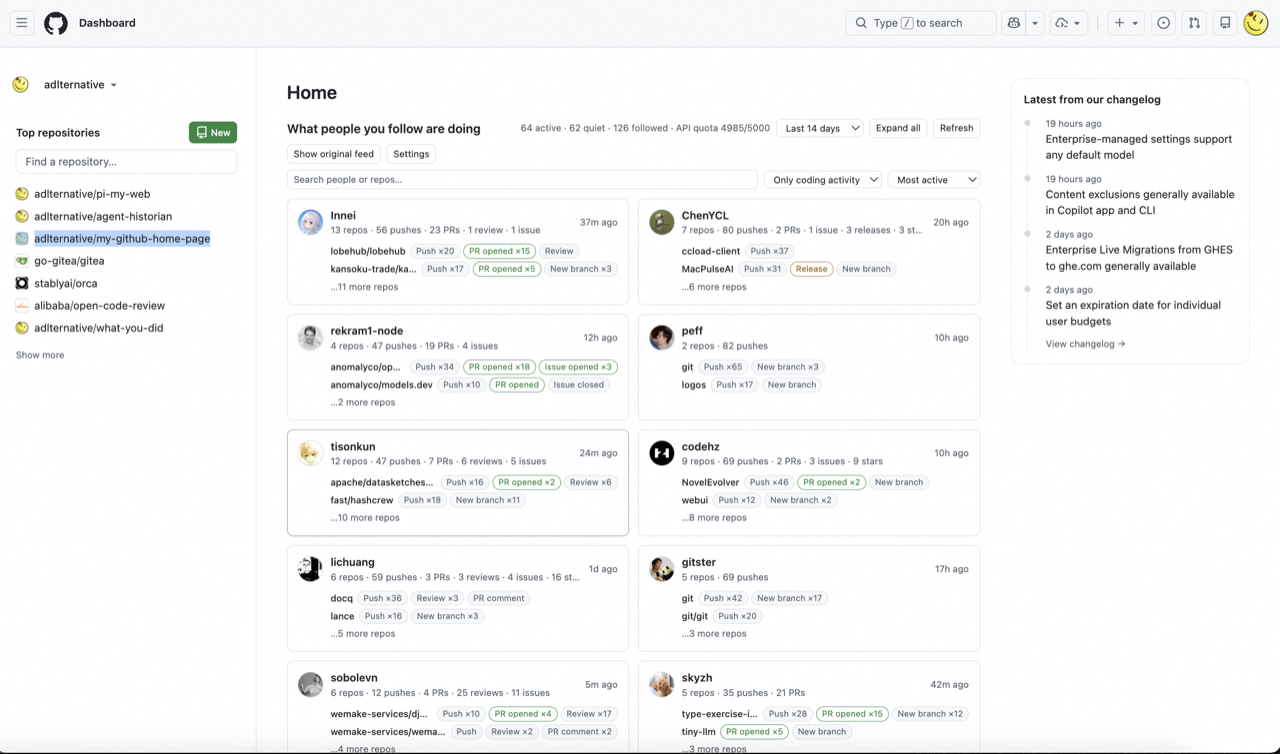
my-github-home-page — a two-column grid of per-user activity cards, sorted by activity, filterable to coding actions only
Two interesting implementation choices
Fable 5.1 chose to make it a Chrome extension instead of a standalone page. That keeps the new feed inside github.com: I open GitHub as usual and the extension improves the page that is already there.
It also accounted for GitHub API rate limits being different with and without a token, and handled both cases. I found that detail surprisingly thoughtful.
Next: GitHub Trending
GitHub Trending is outdated too. It deserves to be rebuilt.
GitHub 首页一次只给不到十条动态,想看更多就得像刷 Twitter 一样一直往下翻,但还是完全看不到朋友或者感兴趣的大佬最近在干什么。
今天,我写了 my-github-home-page
今天我用 Fable 5.1 写了 my-github-home-page。它把我关注的人的近期活动按人聚合,一眼就能看到谁最近在动哪个仓库,有多少 push、PR、review 和 release。
项目地址:https://github.com/adlternative/my-github-home-page
my-github-home-page——两栏的按人分组动态卡片,按活跃度排序,可只看 coding 行为
两个很有趣的实现选择
Fable 5.1 没有选择另写一个独立页面,而是把它做成 Chrome 插件,直接改造 GitHub 首页。这样不用多开一个网站,照常打开 GitHub 就能用。
它还知道 GitHub API 在有 token 和没有 token 时限流不同,并分别处理了两种情况。这个细节挺有趣。
下一步:GitHub Trending
GitHub Trending 也很落后,它值得被改造。